EcoScript: A Real-Time Presentation Supporting Tool using a Speech Recognition Model
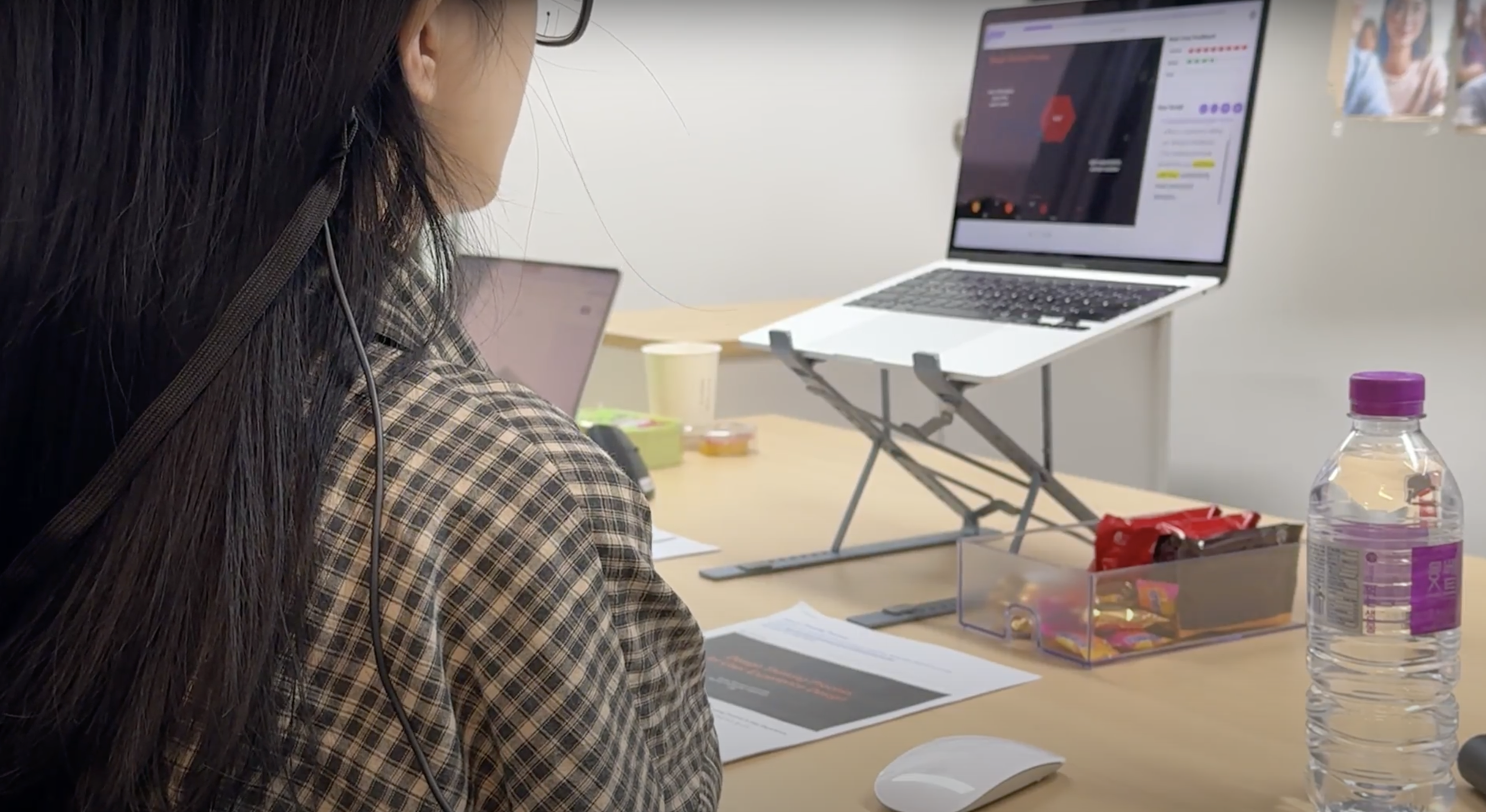
The hardest second in a talk is the one right after you look up at the audience — when you turn back to your notes and can’t find the line you were on.
A six-month project (Nov 2023 – Apr 2024) for a graduate HCI course at Ewha Womans University, built by a three-person team where I served as co-first author. The work became “EcoScript: A Real-Time Presentation Supporting Tool using a Speech Recognition Model,” published at IEEE IRI ‘24.
1. Research background
A presentation asks the speaker to do several things at once: hold to the clock, keep the delivery clear, and stay with the audience rather than the slides. The research prototypes that try to help usually reach for AR or VR — smart glasses like Google Glass that paint feedback over the speaker’s view. In a real room that hardware works against the person wearing it. It is heavy, it takes the attention that belongs to the audience, and it hands an already nervous speaker one more device to operate. We started from a plainer question: could the same real-time help arrive through the equipment a speaker already has, a laptop and their own voice?
2. The core problem
A speaker needs help at the exact moment their hands, eyes, and attention are already spoken for. Anything that has to be scrolled, watched, or clicked takes attention away from the talk it was meant to support.
We didn’t want to guess at the rest, so we ran a formative survey before designing anything: 81 university students, 28 questions, twelve days. More than 80% said they write their script out beforehand and read from it while presenting, which told us the real work happened in the script, not the slide. The difficulties they reported fell into four groups: fear of speaking in public (46.9%, the reason so many lean on a full script), a shaky voice once the nerves set in (33.3% — pace, tone, clarity), losing the words and their place in the script while trying to make eye contact (33.3% forget the content, 22.2% lose their spot scrolling a long script), and weak time management with no feedback in the moment (20.9%).
Hypothesis. A light web tool that follows the script by voice and shows vocal feedback as it happens could keep a speaker’s hands free and lift both the delivery and the experience, without a single piece of worn hardware.
What we built. EcoScript is a working prototype (React front end, FastAPI back end), made of three parts that each answer one of the survey’s complaints:
- A countdown, not a stopwatch. The timer runs down toward the target length as a progress bar, so the speaker reads the time left at a glance instead of subtracting in their head.
- Vocal feedback in the plainest signal we could find. Volume, pitch, and speed each show as an eight-segment bar. The four middle segments turn green when the value sits in a healthy range; the outer four turn red when it strays. Volume and pitch come from the Praat library, speaking rate from Google Cloud Speech-to-Text, and the pitch ranges follow prior work — 50–250 Hz for men, 120–350 Hz for women. We wanted a color the eye could catch in passing, not a graph to study.
- A script that follows the voice. Speech is transcribed live and matched against the saved script: words already spoken fade to gray, the next few glow yellow, and the view scrolls itself to keep the current line visible. When a cue card is finished, the next one comes up on its own.
Where the design work actually went. The parts I care about most are the ones that only matter in a real room.
- The script is broken into cue cards by subheading instead of poured onto the slide in one block, which lightens the reading load and gives the eye an easy place to land when the speaker looks back down.
- The tracker leaves off-script speech alone. When the speaker answers a question from the floor, the system waits instead of losing the thread.
- Manual navigation stays one click away for the moments speech recognition mishears a word.
3. Method
We compared EcoScript with Microsoft PowerPoint’s presenter mode — the tool most survey respondents already used — in a within-subjects study of 20 participants (mean age 23.8; 12 women, 8 men), with the order of the two tools counterbalanced. Each person gave two five-minute talks from Stanford’s CS147 HCI slides, one per tool, wearing Tobii Pro Glasses 3 to record where they looked. To keep it close to a real talk, we projected the slides and set photographs of an audience in front of the speaker. We logged how much of each talk the voice stayed in its healthy range, counted the eye contacts and how long each one lasted from the gaze heatmaps, and collected a 7-point Likert rating and open comments after each condition.
4. Insight
- The voice measurements hardly moved. The share of time volume, speed, and pitch stayed in range was statistically indistinguishable between the two tools (Wilcoxon signed-rank). Live feedback, on its own, did not steady anyone’s voice.
- Satisfaction moved a great deal. EcoScript averaged 6.20 of 7 (SD 0.70) against PowerPoint’s 3.70 (SD 1.22). Participants pointed to the live feedback and the self-scrolling script. What they felt ran well ahead of anything the logs could measure.
- That distance is the interesting part. With their measured voice control essentially unchanged, speakers still said the feedback let them see their own delivery from the outside, adjust it, and trust it more. The tool earned its score by making people aware of what they were doing rather than doing it for them.
- Freed hands changed how people stood. With no mouse or scroll wheel to mind, participants gestured naturally. The number of times they met the audience’s eyes was about the same on both tools, but on EcoScript each look lasted longer, because they could glance down and find their place at once.
- The feedback had a cost as well as a use. Some participants found the constantly moving bars tiring and checked them only now and then, to keep their concentration. A live signal spends attention even as it repays it.
5. Conclusion
EcoScript makes the case that speech recognition alone, with nothing worn and nothing extra to hold, can carry real-time presentation support on an ordinary laptop. The hypothesis held for experience but not for raw performance: the tool never measurably steadied anyone’s voice, yet it lifted satisfaction well above the baseline, held the audience’s eye longer, and let speakers move as they would without it. Its worth settled in two places — the awareness it gave presenters, and the manual load it took off them — carried by the lightest interface we could manage.
6. Retrospective
- We never settled the right dose of feedback. A continuous signal tires people, and earlier work suggests feedback given at intervals helps more than feedback given constantly, but in this study we never found the cadence. The next step is to test when and how often the feedback should appear, and to let the speaker set that density themselves.
- We should have accounted for languages other than Korean. The healthy vocal ranges were set for speakers of standard Korean. Nationality, dialect, and a second-language accent all need to be reflected in the feedback thresholds.
- We needed feedback on how the audience saw the speaker. Our theme was software that supports the speaker, so we ran the user study on speakers. But a presentation is two-way, so we should also have measured how a speaker using EcoScript came across to the audience. If I ran the same study again, I would treat not just the target user but the whole environment in which they use a feature — everything around that use — as part of what gets evaluated.
7. What I learned
- The result that mattered most was the one the numbers missed. The voice measurements didn’t budge, yet satisfaction nearly doubled. Reading the logs alone, I could have written the feature off. The real effect was quieter: people felt more aware, and surer of themselves. I came away setting measured value and felt value side by side, and treating the distance between them as the finding rather than an error to explain away.
- A feature is paid for in the user’s attention. The same live feedback people praised also wore them out, so they spent it sparingly to guard their focus. Information is not free help; where and how often it appears can decide more than the information itself does.
- The evaluation happened on the speaker’s side alone. EcoScript is a tool for the speaker, so we designed the user study around speakers. But a presentation is two-way by nature. Another test of whether the tool succeeded lay not in whether the speaker felt more at ease, but in whether the audience receiving the talk found it better. We measured only the speaker’s experience and never the audience’s. If I ran the same study again, I would take not just the target user but the whole situation in which they use the feature — both sides of the communication, the audience included — as what gets evaluated.
발표에서 가장 곤란한 순간은 청중과 눈을 맞춘 바로 다음이다. 대본으로 시선을 되돌렸을 때, 읽고 있던 줄을 다시 찾지 못하는 그 순간.
이화여자대학교 대학원 HCI 수업에서 진행한 6개월(2023.11 – 2024.04) 프로젝트로, 3인 팀에서 공동 1저자로 참여했습니다. 이 작업은 “EcoScript: A Real-Time Presentation Supporting Tool using a Speech Recognition Model”으로 IEEE IRI ‘24에 게재되었습니다.
1. 리서치 배경
발표는 발표자에게 여러 가지를 한꺼번에 요구합니다. 시간을 지켜야 하고, 내용을 또렷하게 전해야 하며, 슬라이드가 아니라 청중과 함께 있어야 합니다. 이를 돕겠다는 기존 연구용 도구들은 대개 AR이나 VR로 향합니다. Google Glass 같은 스마트 글래스가 발표자의 시야 위에 피드백을 덧그리는 식이죠. 하지만 실제 발표장에서 그 장비는 착용한 사람에게 되레 불리하게 작동합니다. 무겁고, 청중에게 두어야 할 주의를 앗아가며, 그러잖아도 긴장한 발표자에게 조작할 기기를 하나 더 얹습니다. 저희는 더 단순한 질문에서 출발했습니다. 발표자가 이미 가진 것, 노트북과 자신의 목소리만으로 같은 실시간 도움을 줄 수는 없을까요?
2. 핵심 고민
발표자에게 도움이 필요한 순간은, 손과 눈과 주의가 이미 다른 데 매여 있는 바로 그 순간입니다. 스크롤하거나, 지켜보거나, 클릭해야 하는 것은 무엇이든 자신이 돕겠다던 발표에서 주의를 빼앗아 갑니다.
지레 짐작하기 보다 설문을 돌렸습니다. 대학생 81명, 28개 문항, 12일. 응답자의 80% 이상이 대본을 미리 써 두고 발표 중에 그것을 읽는다고 답했고, 이는 실제 작업이 일어나는 곳이 슬라이드가 아니라 대본임을 알려주었습니다. 이들이 겪는 어려움은 네 갈래로 모였습니다. 사람들 앞에서 말하는 것에 대한 두려움(46.9%, 많은 이가 대본에 매달리는 이유), 긴장이 시작되면 흔들리는 목소리(33.3% — 속도·톤·명료도), 아이컨택을 시도하면서 대본을 기억하고 읽던 자리를 지키는 어려움(33.3%는 내용을 잊고, 22.2%는 긴 대본을 스크롤하다 위치를 놓침), 그리고 그 순간의 피드백 없이 이루어지는 취약한 시간 관리(20.9%).
가설. 음성으로 대본을 따라가고 발성 피드백을 실시간으로 보여주는 가벼운 웹 도구라면, 착용하는 장비 하나 없이도 발표자의 손을 자유롭게 두고 전달과 경험을 함께 끌어올릴 수 있을 것이다.
무엇을 만들었나. EcoScript는 실제로 동작하는 프로토타입(React 프론트엔드, FastAPI 백엔드)이며, 설문이 짚은 불편에 각각 답하는 세 부분으로 이루어져 있습니다.
- 스톱워치가 아니라 카운트다운. 타이머는 목표 시간을 향해 줄어드는 프로그레스 바로 돕니다. 발표자는 머릿속으로 빼기를 하는 대신 남은 시간을 한눈에 읽습니다.
- 찾을 수 있는 가장 단순한 신호로 준 발성 피드백. 성량·음높이·속도를 각각 여덟 칸짜리 바로 보여줍니다. 가운데 네 칸은 값이 적정 범위에 있을 때 초록으로, 바깥 네 칸은 벗어날 때 빨강으로 켜집니다. 성량과 음높이는 Praat 라이브러리로, 말하기 속도는 Google Cloud STT로 분석했고, 음높이 범위는 선행 연구를 따라 남성 50–250 Hz, 여성 120–350 Hz로 두었습니다. 들여다보고 해석하는 그래프가 아니라, 곁눈으로 스치듯 읽히는 색을 원했습니다.
- 목소리를 따라오는 대본. 발화를 실시간으로 텍스트로 옮겨 저장된 대본과 맞춥니다. 이미 말한 단어는 회색으로 잦아들고, 다음 몇 단어는 노랑으로 밝아지며, 화면은 스스로 스크롤해 지금 읽는 줄을 시야에 둡니다. 큐카드를 다 읽으면 다음 카드가 알아서 올라옵니다.
그 외 세세한 디테일.
- 대본을 슬라이드에 한 덩어리로 쏟지 않고 소제목 단위 큐카드로 나눴습니다. 읽는 부담이 가벼워지고, 발표자가 시선을 내렸을 때 눈이 내려앉을 자리가 생깁니다.
- 추적기는 대본에 없는 말은 건드리지 않습니다. 발표자가 청중의 질문에 답할 때, 시스템은 흐름을 놓치는 대신 기다립니다.
- 음성 인식이 단어를 잘못 들은 순간을 위해 수동 이동을 늘 한 번의 클릭 거리에 두었습니다.
3. 실험 방법
설문 응답자 대부분이 이미 쓰던 Microsoft PowerPoint 발표자 모드를 비교 대상으로 삼아, 참여자 20명(평균 23.8세, 여성 12명·남성 8명)을 대상으로 피험자 내 설계로 비교했고 두 도구의 순서는 교차 배치했습니다. 각 참여자는 Stanford CS147 HCI 강의 슬라이드로 5분 발표를 두 번, 도구마다 한 번씩 했고, 시선을 기록하기 위해 Tobii Pro Glasses 3를 착용했습니다. 실제 발표에 가깝게 하려고 슬라이드를 스크린에 투사하고 발표자 앞에 청중 사진을 세워 두었습니다. 발표 중 목소리가 적정 범위에 머문 시간의 비율을 로그로 남기고, 시선 히트맵에서 아이컨택 횟수와 한 번의 지속 시간을 셌으며, 각 조건이 끝날 때마다 7점 리커트 평가와 자유 응답을 받았습니다.
4. 인사이트
- 음성 측정치는 거의 움직이지 않았다. 성량·속도·음높이가 범위에 머문 시간의 비율은 두 도구 사이에서 통계적으로 구분되지 않았습니다(Wilcoxon signed-rank). 실시간 피드백이 그 자체로 누군가의 목소리를 고르게 만들어 주지는 않았습니다.
- 만족도는 크게 움직였다. EcoScript는 7점 만점에 평균 6.20(SD 0.70), PowerPoint는 3.70(SD 1.22)이었습니다. 참여자들은 실시간 피드백과 스스로 넘어가는 대본을 이유로 들었습니다. 이들이 느낀 것은 로그가 잴 수 있는 것보다 훨씬 앞서 있었습니다.
- 간극의 의미는? 측정된 음성 제어는 사실상 그대로인데도, 발표자들은 피드백 덕에 자신의 전달을 바깥에서 바라보고, 손보고, 더 믿게 되었다고 말했습니다. 이 도구는 발표자를 대신해 목소리를 다듬어 준 것이 아니라, 자신이 무엇을 하고 있는지 스스로 알아차리게 함으로써 그 점수를 얻었습니다.
- 자유로워진 손이 서 있는 방식을 바꿨다. 마우스나 스크롤을 신경 쓸 필요가 없어지자 참여자들은 자연스럽게 제스처를 썼습니다. 청중과 눈을 맞춘 횟수는 두 도구가 비슷했지만, EcoScript에서는 한 번의 눈맞춤이 더 오래 이어졌습니다. 시선을 내렸다가도 읽던 자리를 곧바로 찾을 수 있었기 때문입니다.
- 피드백에는 쓸모만큼 비용도 있었다. 어떤 참여자들은 끊임없이 움직이는 바를 피곤해했고, 집중을 지키려 가끔씩만 확인했습니다. 실시간 신호는 되돌려주는 만큼 주의를 씁니다.
5. 결론
EcoScript는 착용하는 것도 손에 드는 것도 없이, 음성 인식만으로 평범한 노트북 위에서 실시간 발표 지원을 감당할 수 있음을 보여줍니다. 가설은 경험에서는 맞았고 순수한 수행 성과에서는 맞지 않았습니다. 도구는 누구의 목소리도 측정 가능한 수준으로 고르게 만들지 못했지만, 만족도를 기준선보다 훨씬 높이고, 청중의 시선을 더 오래 붙들고, 발표자가 도구 없이 그러하듯 움직이게 했습니다. 그 값어치는 두 곳에 자리 잡았습니다. 발표자에게 준 ‘알아차림’, 그리고 그들에게서 덜어 낸 수동 조작의 부담. 그 둘을 저희가 만들 수 있는 가장 가벼운 인터페이스로 전했습니다.
6. 회고
- 적절한 피드백의 양을 끝내 정하지 못했다. 연속적인 신호가 사람을 지치게 한다는 것은 보았고 선행 연구도 간헐적 피드백이 상시 피드백보다 낫다고 말하지만, 저희는 이번 연구에서 그 주기를 찾지 못했습니다. 다음 단계는 피드백을 언제 얼마나 자주 띄울지 검증하고, 그 밀도를 발표자가 직접 조절하게 하는 것입니다.
- 한국어를 제외한 다른 언어에 대한 특성을 고려해야 했다. 적정 발성 범위는 표준 한국어 화자를 기준으로 설정했습니다. 국적과 방언, 제2언어 억양이 피드백 임계값에 반영되어야 합니다.
- 발표자를 바라보는 청중에 대한 피드백이 필요했다. 저희는 발표자를 돕는 SW라는 테마에서 발표자를 대상으로 유저 스터디를 진행했습니다. 다만, 발표는 양방향 소통이기에 청중이 느꼈을 때 ecoscript와 함께 하는 발표자의 모습이 측정되었어야 합니다. 다음 번에 같은 연구를 한다면, 타겟 유저 뿐만 아닌 타겟 유저가 특정 기능을 사용하는 그 주변 환경을 고려해서 그 주위 상황 전부를 평가 대상에 삼을 것입니다.
7. 러닝
- 가장 중요한 결과는 숫자가 놓친 것이었다. 음성 측정치는 꿈쩍하지 않았는데 만족도는 거의 두 배가 되었습니다. 로그만 읽었다면 이 기능을 실패로 적었을지도 모릅니다. 진짜 효과는 더 조용한 곳에 있었습니다. 사람들은 더 잘 알아차렸고, 스스로를 더 믿게 되었습니다. 저는 측정된 가치와 체감된 가치를 나란히 두는 법을, 그리고 그 사이의 거리를 설명해 없앨 오차가 아니라 발견으로 다루는 법을 배웠습니다.
- 기능의 값은 유저의 주의로 치른다. 사람들이 칭찬한 바로 그 실시간 피드백이 동시에 그들을 지치게 했고, 그래서 그들은 집중을 지키려 그것을 아껴 썼습니다. 정보는 공짜 도움이 아닙니다. 그것이 어디에 얼마나 자주 나타나는지가 정보 그 자체보다 더 많은 것을 좌우할 수 있습니다.
- 평가가 발표자 한쪽에서만 이뤄졌다. EcoScript는 발표자를 돕는 도구였기에, 유저 스터디도 발표자를 대상으로 설계했습니다. 그런데 발표는 본질적으로 양방향입니다. 이 도구가 성공했는지를 가르는 또 다른 기준은 발표자가 편해졌는지가 아니라, 그 발표를 받는 청중이 더 나은 발표라고 느꼈는지에 있었습니다. 저희는 발표자의 경험만 측정했고, 정작 청중의 경험은 측정하지 못했습니다. 다시 같은 연구를 한다면, 타겟 유저만이 아니라 그 유저가 기능을 쓰는 상황 전체 — 청중을 포함한 소통의 양쪽 — 를 평가 대상으로 삼을 것입니다.