What is HCI?
What is HCI?
When we look at an object, we guess how it works without even thinking about it. Take a look at the two doors below. Which one do you want to push, and which one do you want to pull?
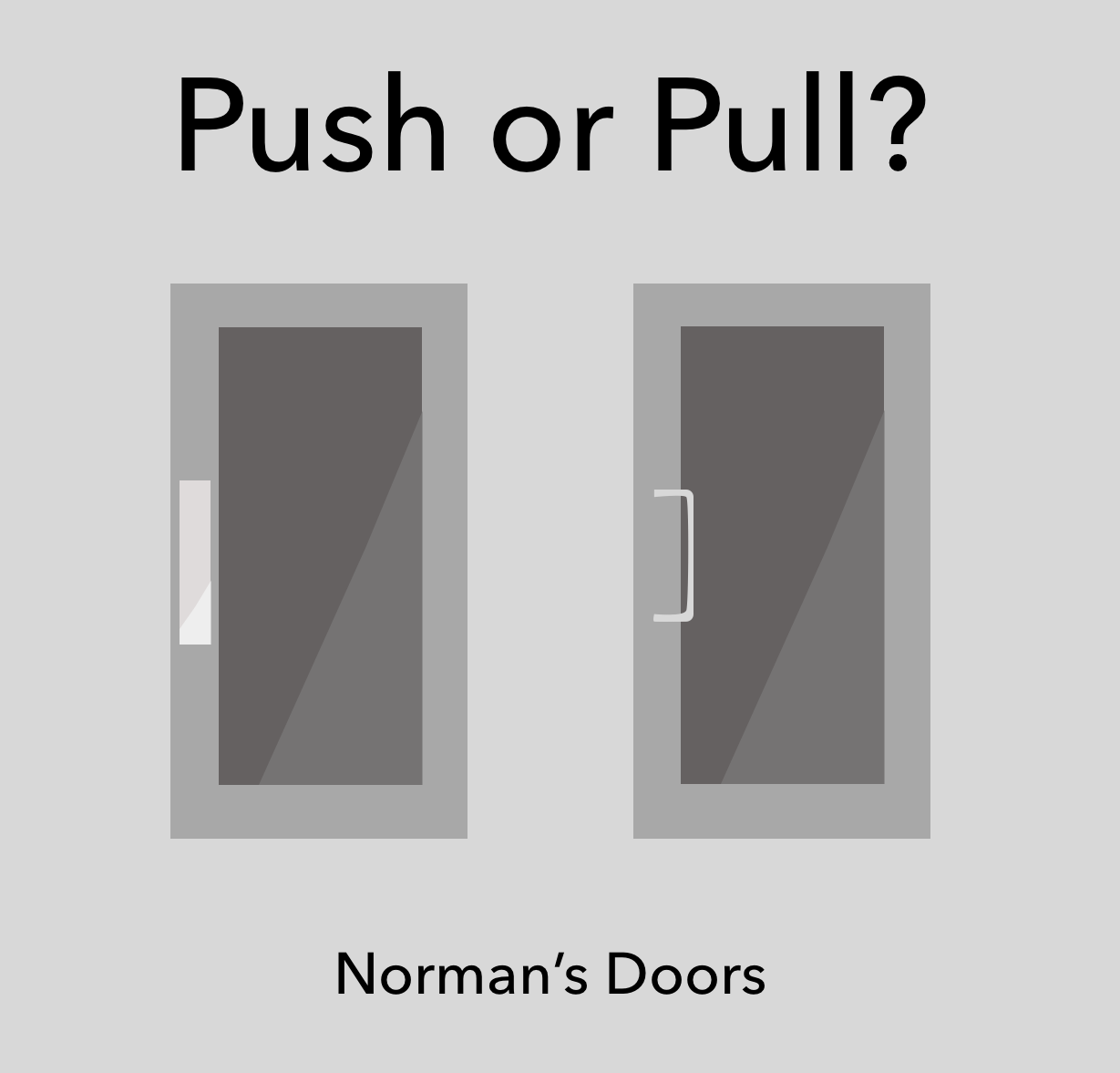
A flat plate makes you push with your palm, and a handle you can grip makes you hook your fingers around it and pull. Your body moves first, before the door has told you anything. So even with PUSH written on the right-hand door, people keep pulling.
The designer Donald Norman argued that the moment you have to explain how something works with a label, the design has already failed. It is why doors like these are called Norman doors.
HCI starts here.
1. Between people and technology
HCI (Human-Computer Interaction) is the field that asks how people can use computing technology easily, quickly, enjoyably, and safely. Instead of fitting people to technology, it tries to fit technology to people.
That question breaks into a lot of smaller ones. There is the design work of deciding where a particular button should go. There is the cognitive psychology of asking why a person behaved that way and not another. Actually building it is computer science’s job. And how the technology reshapes people’s lives is what the social sciences look at. HCI covers all four. So when someone says they “research HCI,” they usually go on to say which of those threads they actually work on.
2. What HCI actually studies
The most common misconception about HCI is that it is all about making a UI look nice. The questions this field is actually holding onto are much broader.
Who is being left out
You have probably seen an older person take a step back from a kiosk at a fast-food restaurant. The screen is undeniably clean. It is just that the standard for “clean” was a twenty-something’s eyes and fingers. You will also often see adults struggling because no one ever showed them how the device works.
People with weak eyesight. People whose hands shake. People who cannot see the screen at all. People who are not comfortable with digital devices. For them, a device that is hard to use is not a mild inconvenience — it is a closed door. Accessibility research looks for ways to open it. It sounds like consideration for a small minority, but every one of us will stand in front of that door eventually.
Building new interactions and interfaces
The ways we operate things today were not there from the start. Someone built them and ran studies on them, people confirmed that this one felt easier, and what survived is what we use.
So researchers in this area look for ways of interacting that do not exist yet. Touch and gesture, voice, haptics, gaze. Some work with smell; some take heart rate, muscle tension, brain waves, or breathing as input.
For example, if something responds within 0.1 seconds of you reaching for it, it feels alive; once 0.5 seconds pass, it starts to feel sluggish. You can manufacture the sensation of “it clicked” out of a single vibration — and the right strength and duration get found through experiments. Having things handled for you is convenient, but handled too much and you feel pushed out of your own task.
Some people build the objects rather than the methods. New sensors and tracking devices, displays, haptic feedback hardware, and the materials and fabrication techniques that make them possible. Research on weaving circuits into fabric to make interfaces you wear belongs here.
Understanding people
Just as important as building things is finding out how people actually use what has already been built. Usability research — what we usually call UX — is part of this. Some research looks at the tendencies of groups rather than individuals: how groups, organizations, and communities collaborate through technology, and how they come apart through it. Research on social media, crowdsourcing, and remote meetings sits here too.
Beyond these there are many more areas: privacy, visualization, education, games, health.
3. What comes next
The interface has kept moving. From the desktop to the smartphone, and then to the smartwatch. Every time the screen got smaller and closer to the body, the rules of interaction had to be rewritten. Pinching with two fingers to zoom, and the screen waking when you raise your wrist, were never self-evident — someone researched them and decided.
Now we are in the AI era. AI gives a different answer each time, and it states wrong answers with confidence. So the user’s worry has shifted from “how do I use this” to “can I trust this.” Whether a person can notice when the AI is wrong, and conversely whether they stop reviewing altogether once it gets things right often enough. Benchmark scores do not answer that.
Robots are arriving too. At what distance does a person start to feel uncomfortable as a robot approaches? Where does it have to look before you feel it has recognized you? The grammar for talking with something that has no screen has not been settled yet.
Inside a self-driving car it gets harder still. What do you show someone who has let go of the wheel? When they are watching a movie and are suddenly told to take over, how many seconds does it take them to read the situation? This is where making something enjoyable and making it safe collide head-on.
Homes are the same. A smart home turns the lights off on its own and speaks to you first. But when should it step in, and when should it stay quiet? The line between convenience and surveillance is thinner than you would think.
Every time a new technology appears, the question of how people will meet it has to be answered again. That is why HCI still has work left to do.
Wrapping up
Having studied it, I found the appeal of this field was less in producing impressive new technology quickly, and more in studying the people who will end up using it.
When a new technology arrives, we are busy learning it. But have you ever watched the person encountering and using it? What they miss in front of a given screen, what they over-trust, where they give up entirely and turn away.
Observing people and refining computing technology to fit them struck me as genuinely admirable work. We certainly need people who build fast, smart models. At the same time, we need people working to make sure that technology settles into our lives safely and fairly. And in an era where new technology ships this quickly, I think HCI research is essential.
So starting with the next post, I want to introduce interesting HCI studies one at a time, along with the methodologies they use.
HCI란 무엇일까?
우리는 물건을 보면 그것이 어떻게 작동할지 무의식적으로 짐작합니다. 아래 두 문을 봐주세요. 어느 쪽을 밀고, 어느 쪽을 당기고 싶으신가요?
평평한 판이 붙어 있으면 손바닥으로 밀게 되고, 잡을 수 있는 손잡이가 있으면 손가락을 걸어 당기게 됩니다. 문이 시키지 않아도 몸이 먼저 움직이죠. 그래서 오른쪽 문에 PUSH라고 적어놓아도 사람들은 계속 당깁니다.
디자이너 도널드 노먼은 사용법을 안내문으로 설명해야 하는 순간 그 디자인은 이미 실패한 거라고 했습니다. 이런 문을 노먼 도어라고 부르는 이유입니다.
HCI는 여기서 시작합니다.
1. 사람과 기술 사이
HCI(Human-Computer Interaction)는 인간이 어떻게 하면 컴퓨팅 기술을 쉽고, 빠르고, 재미있고, 안전하게 이용할 수 있는지 고민하는 연구 분야입니다. 사람을 기술에 맞추는 대신, 기술을 사람에게 맞추려는 시도이죠.
그래서 다양한 세부 연구 항목들이 있습니다. 특정 버튼을 어디에 둘지 고민하는 디자인 영역이 있고요. 사람이 왜 하필 그렇게 행동했는지 고민하는 인지심리학 영역이 있습니다. 그걸 실제로 구현하는 건 컴퓨터공학의 일이죠. 그 기술이 사람들의 삶을 어떻게 바꾸는지는 사회과학이 봅니다. HCI는 이 네 가지를 모두 포괄합니다. 그래서 ‘HCI를 연구한다’고 하면 그 속에서 어떤 세부 항목을 연구하는지까지 보통 덧 붙여 말하는 것 같습니다.
2. HCI의 연구 영역
HCI에 대한 가장 흔한 오해는 UI를 예쁘게 만드는 것이 전부라고 착각한다는 점입니다. 실제로 이 분야가 붙잡고 있는 질문은 훨씬 넓습니다.
누가 못 쓰고 있는가
패스트푸드점 키오스크 앞에서 뒤로 물러서는 어르신을 본 적 있으실 겁니다. 화면은 분명 깔끔합니다. 다만 그 깔끔함의 기준이 20대의 눈과 손가락이었을 뿐이죠. 더불어 디지털 기기 사용 조작 방법을 몰라 헤매는 어른들을 종종 보실겁니다.
시력이 약한 사람, 손이 떨리는 사람, 화면을 볼 수 없는 사람, 디지털 기기에 친숙하지 않은 사람. 이들에게 어려운 디지털 기기는 조금 불편한 물건이 아니라 아예 닫힌 문입니다. 접근성 연구는 이를 해결하는 방법을 찾습니다. 소수를 위한 배려처럼 들리지만, 우리 모두 언젠가는 그 문 앞에 서게 될 겁니다.
새로운 인터랙션과 인터페이스 만들기
지금 우리가 쓰는 조작 방식은 원래부터 있던 게 아닙니다. 누군가 만들어서 실험했고, 사람들이 이게 편하다고 확인해준 결과가 남은 겁니다.
그래서 이쪽 연구자들은 아직 없는 조작법을 찾습니다. 터치와 제스처, 음성, 햅틱, 시선. 냄새를 쓰기도 하고, 심박수나 근육 긴장도, 뇌파, 호흡을 입력으로 받기도 합니다.
예를 들어, 손을 뻗었을 때 0.1초 만에 반응하면 살아 있다고 느끼지만, 0.5초가 지나면 답답해집니다. 진동 하나로 ‘눌렸다’는 감각을 만들어낼 수도 있는데, 그 세기와 길이는 실험으로 찾아냅니다. 알아서 해주면 편하지만, 너무 알아서 하면 내가 밀려난 기분이 들고요.
방법이 아니라 물건 자체를 만드는 사람들도 있습니다. 새로운 센서와 트래킹 장치, 디스플레이, 햅틱 피드백 기기, 그리고 그걸 가능하게 하는 소재와 제작 기법. 옷감에 회로를 짜 넣어 입는 인터페이스를 만드는 연구가 여기 속합니다.
사람을 이해하기
만드는 일만큼 중요한 게, 이미 만들어진 걸 사람들이 어떻게 쓰는지 알아내는 일입니다. 흔히 UX라고 부르는 사용성 연구도 이 분야입니다. 한 사람 개개인이 아니라 집단의 경향성을 보는 연구도 있습니다. 그룹과 조직, 커뮤니티가 기술을 매개로 어떻게 협업하고 또 어떻게 갈라지는지. 소셜미디어, 크라우드소싱, 원격 회의 연구도 이 분야에 속합니다.
이 밖에도 프라이버시, 시각화, 교육, 게임, 건강까지 다양한 연구 영역이 있습니다.
3. 앞으로
인터페이스는 계속 옮겨왔습니다. 데스크톱에서 스마트폰으로, 다시 스마트워치로. 화면이 작아지고 몸에 가까워질 때마다 상호작용의 규칙을 새로 써야 했습니다. 손가락 두 개로 확대하는 동작도, 손목을 들면 화면이 켜지는 것도 원래부터 당연했던 게 아니라 누군가 연구해서 정한 겁니다.
이제는 AI 시대이죠. AI는 매번 다른 답을 내놓고, 틀린 답도 자신 있게 말합니다. 그래서 사용자의 고민이 ‘이걸 어떻게 쓰지’에서 ‘이걸 믿어도 되나’로 옮겨갔습니다. AI가 틀렸을 때 사람이 알아챌 수 있는지, 반대로 너무 잘 맞히면 검토를 아예 그만두게 되는지. 벤치마크 점수로는 나오지 않는 답입니다.
로봇도 생겨나고 있죠. 로봇이 다가올 때 사람이 어느 거리에서 불편해지는지, 어디를 봐야 나를 인식했다고 느끼는지. 화면 없는 상대와 대화하는 문법은 아직 정해진 게 없습니다.
자율주행차 안은 더 까다롭습니다. 운전대를 놓은 사람에게 무엇을 보여줄 것인가. 영화를 보다가 갑자기 운전대를 잡으라는 말을 들었을 때 상황을 파악하는 데 몇 초가 걸리는가. 즐겁게 만드는 일과 안전하게 만드는 일이 정면으로 부딪히는 곳입니다.
집도 마찬가지입니다. 스마트홈은 알아서 불을 끄고 먼저 말을 걸어옵니다. 그런데 언제 끼어들고 언제 가만히 있어야 할까요? 편리함과 감시 사이의 선은 생각보다 얇습니다.
새로운 기술이 나올 때마다 사람이 그걸 어떻게 만날지는 매번 다시 답해야 합니다. HCI에 아직 할 일이 남아 있는 이유입니다.
마치며
공부해보니 이 분야의 매력은 멋진 신기술을 빠르게 만들어내는 것 보다, 그 기술을 쓰게 될 ‘사람’을 공부한다는 점에 있었습니다.
새로운 기술이 나오면 우리는 익히느라 바쁩니다. 그런데 그걸 접하고 사용하는 사람을 관찰해 본 적은 있으신가요? 어떤 화면 앞에서 무엇을 놓치는지, 무엇을 과신하는지, 어디에서 아예 포기하고 돌아서는지 말입니다.
사람을 관찰하고 거기에 맞춰 컴퓨팅 기술을 다듬는 일이 저는 참 멋있다고 느꼈습니다. 빠르고 똑똑한 모델을 만드는 사람도 물론 필요합니다. 동시에 그 기술이 우리 삶에 안전하고 공평하게 안착하도록 애쓰는 사람도 필요하고요. 더군다나 신기술이 빠르게 출시되는 지금 시대에는 HCI 연구가 필수적이라고 봅니다.
그래서 다음 글부터는 재미있는 HCI 연구들과, 연구에서 활용하는 방법론들을 하나씩 소개 드리려고 합니다.