UX Experiment Design: Within-Subjects vs Between-Subjects
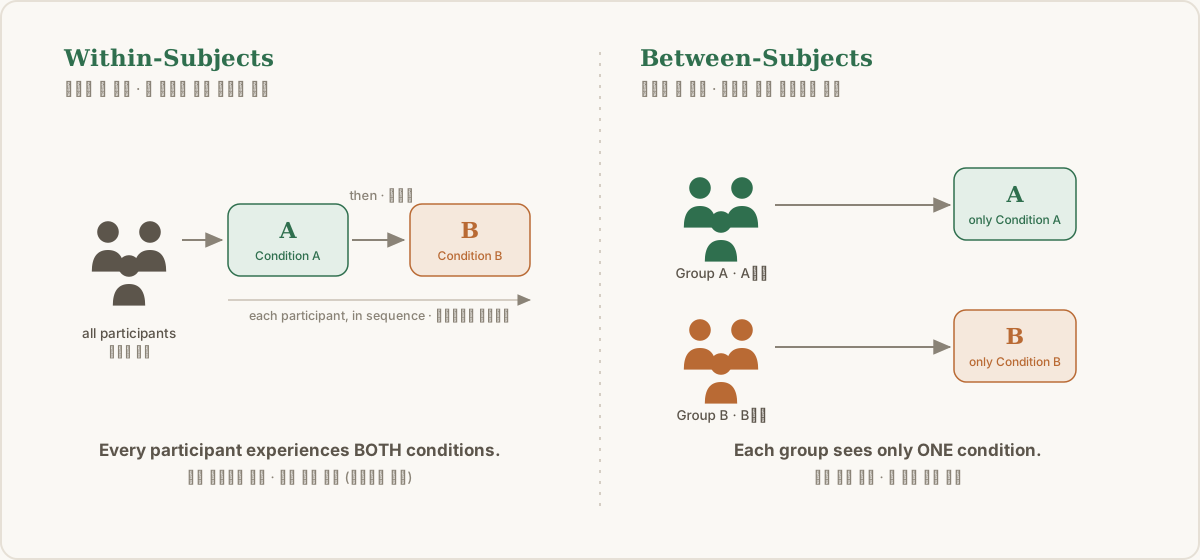
When you run an A/B test or check whether a new feature is actually useful, one of the first calls a researcher has to make is: “How do I assign participants to conditions?” The two most common answers are Within-Subjects Design and Between-Subjects Design.
Here’s how the two differ, and how to decide which one fits your product.
1. Within-Subjects Design
“One person experiences every condition”
Put simply, every participant tries both A and B.
- A simple example: One learner uses the ‘AI speaks first (A)’ feature for a week, then uses the ‘AI only answers when asked (B)’ feature the next week, and compares the two experiences.
👍 Pros
- Individual differences are controlled: Traits like “a naturally sharp user” or “a user who’s good with machines” don’t skew the results. The same person goes through both conditions, so you compare only the difference between the features.
- Works with a small sample (n): Since everyone experiences every condition, even a small number of participants gives you meaningful data. (e.g., 10 participants yields 10 data points for A and 10 for B.)
👎 Cons
- Order effects and fatigue: If a user carries familiarity from the first feature into the second (a learning effect), the second feature’s data can be distorted. Or the session runs long and they get tired.
- 💡 Fix: To prevent this, half the participants try A first and the other half try B first. This counterbalancing is essential.
2. Between-Subjects Design
“Split people into groups; each experiences just one condition”
You split participants into Group A and Group B, and each group experiences only one service/feature. Most A/B tests in practice work this way.
- A simple example: Of 100 participants, 50 (Group A) see only the ‘AI speaks first’ feature and the other 50 (Group B) see only the ‘AI answers when asked’ feature. You then compare the two groups’ averages.
👍 Pros
- Clean, uncontaminated data: Because each user meets only one feature for the first time, order effects and carryover effects from a previous condition are ruled out entirely.
- Short sessions: Each person tests only one thing, so sessions are short and users are less likely to feel fatigued.
👎 Cons
- Needs more participants (n): Since you split into groups and compare averages, reaching a statistically meaningful result takes far more participants than a within-subjects design.
- Risk of individual differences (user variance): If Group A happens to get a lot of ‘heavy users’ who are especially good with the feature, A can score higher because of who ended up in the group, not because the feature itself is better.
3. Quick reference guide (when to use which?)
| Comparison | Within-Subjects | Between-Subjects |
|---|---|---|
| Core idea | One person experiences every version | Split into groups; each experiences a different version |
| Users needed | Works with relatively few | Definitely needs many |
| Biggest risk | An earlier experience affects a later one (order effect) | Groups can be unevenly formed by chance (individual differences) |
| Researcher’s take | “Use it when budget/headcount is tight, or when comparing each user’s shift in perception or fine-grained behavior is the point.” | “Use it when ecological validity matters, like a service right before launch, and you’re worried order effects will ruin the experiment.” |
Wrapping up
When I first designed experiments, I assumed there was a set formula for picking a design. But once I actually had to decide, every choice was a trade-off, and that’s what dragged my deliberation out. Wanting to do it more precisely and more properly, I kept adding things.
Once, I chose a Between-Subjects design for the sake of sustained attention and objective comparison. But I didn’t want to miss individual differences either, so I tacked on a pre-survey and then interviews. As a result, each session ran so long that the very attention I wanted to measure dropped, and I drifted from the point of the experiment. My attempt to gather denser data ended up lowering its quality.
What I learned: detailed segmentation and extra data collection only pay off when you have enough n to support them. With a small sample, adding variables leaves too little data per condition, which makes interpretation harder rather than easier.
So instead of trying to capture everything, I think the right stance is to decide the trade-off that fits the research goal and move on. Deciding what to give up, and what you absolutely must keep, is where a good design starts.
A/B 테스트를 하거나 신기능의 유용성을 검증할 때, 리서처가 가장 먼저 내려야 하는 결정 중 하나는 바로 “실험 참가자들을 어떻게 배치할 것인가?”입니다. 이때 사용하는 대표적인 두 가지 실험 방법론이 바로 피험자 내 설계(Within-Subjects Design)와 피험자 간 설계(Between-Subjects Design)입니다.
오늘은 이 두 방법이 어떻게 다르고, 내 서비스에는 어떤 것을 적용해야 하는지 정리했습니다.
1. 피험자 내 설계 (Within-Subjects Design)
“한 사람이 모든 조건을 전부 경험하는 방법”
쉽게 말해, 실험에 참여한 모든 참가자가 A안과 B안을 모두 써보게 하는 방식입니다.
- 쉽게 이해하는 예시: 한 명의 학습자가 ‘AI가 먼저 말을 거는 기능(A)’도 일주일 동안 써보고, 다음 일주일 동안은 ‘내가 물어봐야만 답하는 기능(B)’도 써본 뒤 두 경험을 비교하는 방식입니다.
👍 장점
- 유저 개인차가 통제됨: “원래 똑똑한 유저”나 “원래 기계를 잘 다루는 유저” 같은 개인의 특성이 결과에 영향을 주지 않습니다. 동일한 사람이 두 조건을 모두 경험하므로 오직 ‘기능의 차이’만 깔끔하게 비교할 수 있습니다.
- 적은 표본(n)으로도 가능: 모든 사람이 모든 조건을 경험하므로, 참가자 수가 적어도 충분히 의미 있는 데이터를 얻을 수 있습니다. (예: 10명이 참여하면 A 조건 데이터 10개, B 조건 데이터 10개를 모두 얻음)
👎 단점
- 순서 효과(Order Effect)와 피로 효과: 유저가 먼저 경험한 기능에 익숙해진 채로 두 번째 기능을 쓰면(학습 효과), 두 번째 기능의 데이터가 왜곡될 수 있습니다. 혹은 실험이 길어져 지칠 수도 있죠.
- 💡 해결 팁: 이를 막기 위해 참가자의 절반은 A를 먼저, 나머지 절반은 B를 먼저 쓰게 하는 역균형화(Counterbalancing) 설계가 필수적입니다.
2. 피험자 간 설계 (Between-Subjects Design)
“사람을 나누어 서로 다른 조건 딱 하나씩만 경험하는 방법”
참가자들을 A그룹과 B그룹으로 쪼갠 뒤, 각 그룹에 딱 하나의 서비스/기능만 경험하게 하는 방식입니다. 실무에서 흔히 말하는 일반적인 A/B 테스트가 대부분 이 방식에 해당합니다.
- 쉽게 이해하는 예시: 100명의 참가자 중 50명(A그룹)에게는 ‘AI가 먼저 말을 거는 기능’만 보여주고, 나머지 50명(B그룹)에게는 ‘내가 물어봐야 답하는 기능’만 보여준 뒤 두 그룹의 데이터 평균을 비교하는 방식입니다.
👍 장점
- 오염되지 않는 순수한 데이터: 유저가 딱 하나의 기능만 처음으로 마주하기 때문에, 이전 실험 조건이 다음 조건에 영향을 주는 ‘순서 효과’나 ‘이월 효과(Carryover Effect)’가 원천 차단됩니다.
- 짧은 실험 시간: 한 사람이 한 가지만 테스트하므로 실험 시간이 짧고, 유저가 피로감을 느낄 확률이 적습니다.
👎 단점
- 더 많은 참가자(n) 필요: 그룹을 쪼개서 평균을 비교해야 하므로, 통계적으로 유의미한 결과를 내려면 피험자 내 설계보다 훨씬 더 많은 수의 참가자가 필요합니다.
- 개인차(유저 변수) 발생 위험: 우연히 A그룹에 유독 해당 기능을 잘 쓰는 ‘헤비 유저’들이 많이 배치된다면, 기능 자체의 우수성 때문이 아니라 ‘사람 차이’ 때문에 A안의 점수가 높게 나올 위험이 있습니다.
3. 한눈에 보는 요약 가이드 (언제 뭘 써야 할까?)
| 비교 항목 | 피험자 내 설계 (Within-Subjects) | 피험자 간 설계 (Between-Subjects) |
|---|---|---|
| 핵심 개념 | 한 사람이 모든 버전을 다 경험함 | 그룹을 나눠 각자 다른 버전을 경험함 |
| 필요 유저 수 | 상대적으로 적은 인원으로 가능 | 확실하게 많은 인원이 필요함 |
| 가장 큰 리스크 | 먼저 한 경험이 나중 경험에 영향을 줌 (순서 효과) | 그룹이 우연히 불공평하게 짜일 수 있음 (유저 개인차) |
| 리서처의 조언 | “예산/인원이 부족하거나, 유저 한 명 한 명의 심리 변화나 디테일한 행동 비교가 핵심일 때 추천!” | “진짜 런칭 직전의 서비스처럼 생태적 타당성이 중요하고, 순서 효과가 실험을 망칠까 봐 걱정될 때 추천!” |
마치며
실험 설계를 고를 때는 정해진 공식이 있을 거라고 생각했습니다. 하지만 막상 정하려니 모든 선택이 트레이드오프였고, 그래서 고민이 길어졌습니다. 더 정교하게, 더 제대로 하고 싶은 마음에 자꾸 무언가를 덧붙이기도 했습니다.
한 번은 집중도 유지와 객관적인 비교를 위해 피험자 간 설계(Between)를 골랐습니다. 그런데 사용자 개별 차이도 놓치기 싫어서 사전 설문지를 붙이고, 인터뷰까지 더했습니다. 그 결과 한 사람당 실험 시간이 너무 길어졌고, 정작 보고 싶었던 집중도가 떨어져 버리며 실험의 본질에서 멀어져 버린 적도 있었습니다. 데이터를 더 촘촘하게 모으려던 시도가 오히려 데이터의 질을 떨어뜨린 셈이죠.
이때 배운 건, 섬세한 분류나 추가 수집은 그것을 뒷받침할 만큼 n수가 충분할 때 의미가 있다는 점입니다. 표본이 적은데 변수만 늘리면 각 조건에 남는 데이터가 너무 적어져서, 오히려 해석을 어렵게 만듭니다.
그래서 모든 걸 챙기려 하기보다, 리서치의 목적에 맞는 트레이드오프를 과감히 정하고 넘어가려는 자세가 필요한 것 같습니다. 무엇을 포기할지, 꼭 챙겨야하는 점은 무엇인지 확실히 정하는 것이 좋은 설계의 시작이라고 생각합니다.